What I learned after spending weeks figuring out how to actually measure agentic AI performance
The Problem Nobody Talks About
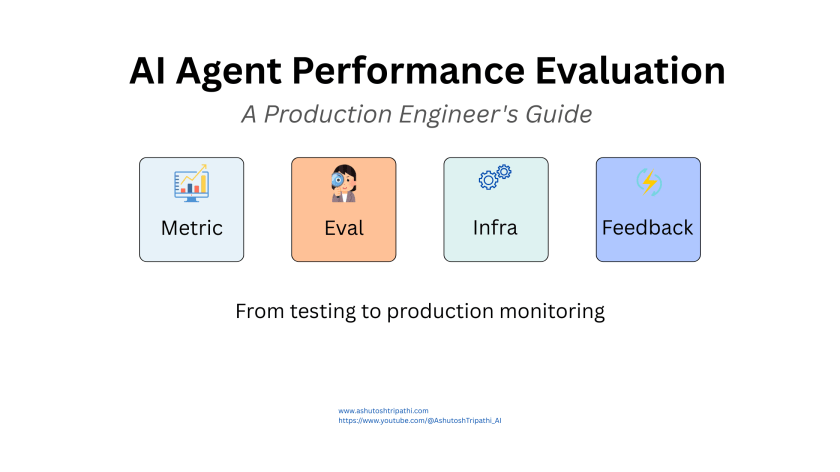
Over the past couple of weeks, I’ve been completely absorbed in trying to figure out how to evaluate agentic AI systems in production. Not the “hey look, it works in my demo” kind of evaluation, but real, production-grade assessment that tells you whether your agent is actually ready for users who will stress-test every edge case you didn’t think of or i would say is it production ready?
And here’s what I discovered: evaluating AI agents is fundamentally different from anything we do in traditional software development. It’s also significantly harder than I initially thought.
The core issue is that agents aren’t deterministic systems. They don’t just execute predefined logic. They make decisions based on context, they choose which tools to use, they navigate multi-step workflows, and they reason through problems in ways that can vary each time. Your standard unit tests that work beautifully for regular software? Pretty much useless here.
You can’t just check if function A returns value B for input C. Agents are dynamic, context-dependent, and sometimes unpredictable. This means we need a completely different evaluation framework.
This guide solves exactly that problem. We’ll start with the fundamentals of what to measure, build up your evaluation infrastructure, and establish the monitoring and improvement cycles that keep agents performing well. Let’s begin.
Start With What Success Actually Means
Before you measure anything, before you build pipelines or write tests or create dashboards, you need to answer one fundamental question: what does success actually look like for your specific agent?
This sounds obvious, but I’ve seen so many teams skip this step and jump straight into measuring whatever is easiest to measure. That’s backwards.
For a customer support agent, success might mean resolving tickets accurately in under five minutes with high customer satisfaction scores. For a research agent, it could be finding comprehensive information from credible sources with proper citations. For a coding agent, success is generating working, maintainable code that meets specifications and passes test cases.
The point is, your success criteria need to connect directly to real-world outcomes that matter to your users and your business. Don’t fall into the trap of measuring vanity metrics just because they’re easy to track. If a metric doesn’t tell you whether users are getting value, it’s probably not worth measuring.
This becomes your north star for everything else. Every metric you track, every evaluation method you use, every test you write it all flows from this definition of success.
The Four Core Metrics That Actually Matter
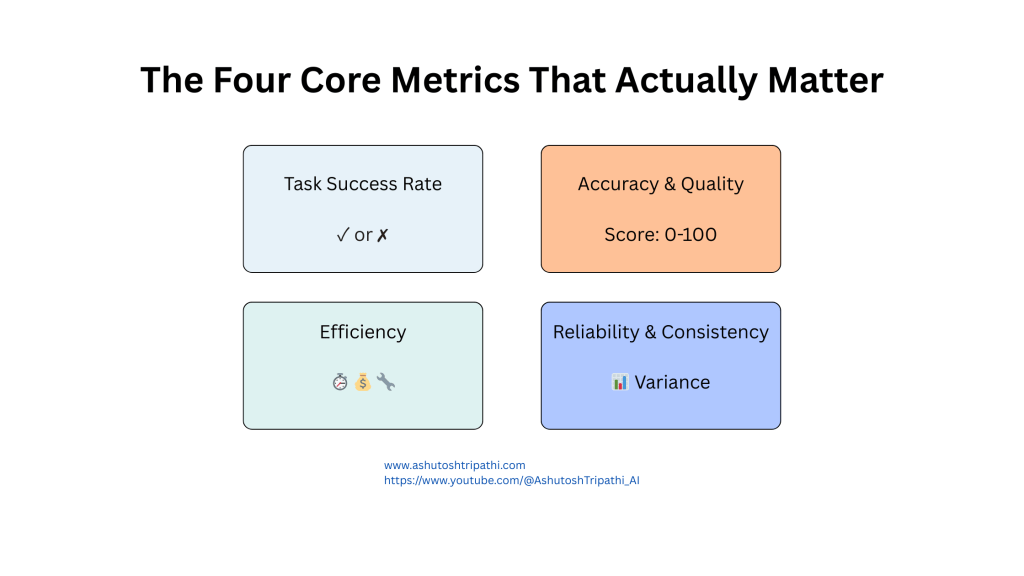
Once you’re clear on what success means, you can identify the metrics that tell you whether you’re achieving it. Through all my testing and iteration, these are the four that consistently matter most:
Task Success Rate
This is your primary metric. Does your agent actually complete the tasks it starts?
It sounds simple, but there’s nuance here. You need to distinguish between “the agent finished running” and “the agent finished successfully.” I’ve seen agents that technically complete but deliver garbage results, or agents that get 80% of the way through a task and then fail silently.
Track successful completions versus failures, errors, timeouts, and incomplete attempts. Break down failures by type – did it fail because of an API timeout? Because it chose the wrong tool? Because it couldn’t parse a response? These patterns tell you where to focus improvements.
When I started tracking this properly, I discovered our agent was “completing” tasks at 95% but only 70% of those completions were actually correct. That gap was invisible until we measured it properly.
Accuracy and Quality
Task completion means nothing if the output is wrong or low quality.
This requires validation against ground truth or quality standards. For factual tasks, measure factual accuracy – are the claims correct? For creative tasks, you need quality rubrics—is the writing clear, is the code maintainable, is the analysis thorough?
The challenge here is that accuracy evaluation often requires human judgment or sophisticated automated checks. You can’t just run a simple equality test. This is where having a well-designed evaluation methodology becomes critical, which I’ll cover in the next section.
One thing I learned the hard way: don’t assume accuracy. I had an agent that I thought was performing well until I actually validated outputs systematically and found it was hallucinating details about 30% of the time. Those hallucinations were subtle enough that casual observation missed them.
Efficiency
This is where your costs live. How many tokens does your agent consume? How many API calls does it make? How long does it take to respond?
An agent that makes 50 API calls to accomplish what could be done in 5 is burning through your budget and killing your latency. I’ve seen agents get stuck in loops making hundreds of calls for a single task because nobody was monitoring this.
Track token usage per task, number of tool calls, and end-to-end latency. Set budgets and alerts. If an agent consistently uses 10,000 tokens for tasks that should need 1000, something is wrong with your prompting or your workflow design.
The efficiency metric also directly impacts user experience. Users don’t care how accurate your agent is if it takes 30 seconds to respond. Latency matters, especially for interactive applications.
Reliability and Consistency
Does your agent perform consistently across similar inputs, or is it all over the place?
Run the same or similar tasks multiple times and measure variance. High variance suggests your agent is brittle or overly sensitive to minor prompt variations. This is especially important for production systems where you need predictable behavior.
I test this by running identical queries multiple times and tracking how often I get substantially different results. If your agent gives different answers to the same question across three runs, that’s a reliability problem you need to solve.
From these four core metrics, everything else flows. They give you a comprehensive view of whether your agent actually works in practice.
How to Actually Measure: Three Evaluation Methods
Knowing what to measure is one thing. Knowing how to measure it is another. Through experimentation, I’ve found you need three different evaluation approaches working together, not just one.
Human Evaluation
This is your gold standard. Have real people evaluate your agent’s outputs against your success criteria.
Yes, it’s slow. Yes, it’s expensive. Yes, it doesn’t scale. But it’s absolutely essential, especially in the early stages.
You need at least 100-200 diverse examples evaluated by humans to establish ground truth. These evaluations become your reference point for everything else. They tell you what “good” actually looks like in practice, not just in theory.
When I set up human evaluation for our research agent, I had evaluators rate outputs on accuracy, completeness, and citation quality. The insights were eye-opening. Things I thought were minor issues turned out to really bother users. Things I thought were problems turned out to be fine.
The key is creating clear evaluation rubrics so different evaluators are consistent. And track inter-rater reliability—if two people evaluating the same output give wildly different scores, your rubric needs work.
LLM-as-Judge
Once you have human-labeled data, you can scale up evaluation by using another LLM to judge your agent’s outputs.
This is powerful because it scales. You can evaluate thousands of outputs quickly. But here’s the critical part: you absolutely must validate that your LLM judge correlates well with human judgment.
I use Claude or GPT-4 as a judge, giving it clear evaluation criteria and asking it to score outputs. But I regularly sample these automated evaluations and compare them to human ratings. If the LLM judge starts diverging from how humans would rate things, I know I need to adjust my prompts or criteria.
The mistake I see teams make is trusting LLM-as-judge blindly. They set it up, see scores that look reasonable, and assume it’s working correctly. Then they optimize their agent based on those scores and end up optimizing for the wrong thing.
Validate your judge against human judgment continuously, not just once at the start.
Automated Validation
For anything with objective correctness, use automated checks.
If your agent generates code, run unit tests. If it extracts structured data, validate against schemas. If it performs calculations, check the math. If it makes API calls, verify the responses.
Automated validation is fast, cheap, and deterministic. Use it wherever you can. The limitation is that it only works for objectively verifiable things. You can’t use automated tests to evaluate whether a creative story is engaging or whether a summary captures the right tone.
In practice, I use all three methods together. Automated validation handles the objective stuff and runs on every output. LLM-as-judge evaluates the subjective aspects at scale. And human evaluation provides ground truth and catches things the other methods miss.
What Makes Agents Different: Evaluating Behavior
Here’s something that took me a while to internalize: with agents, you can’t just evaluate outputs. You need to understand and evaluate how they think and behave.
An agent that gets the right answer through terrible reasoning will eventually fail. An agent that uses tools incorrectly but gets lucky a few times will fall apart under edge cases. You need to evaluate the process, not just the result.
Reasoning Quality
If your agent produces chain-of-thought reasoning or logs its decision-making process, evaluate whether that reasoning is actually sound.
Is the logic coherent? Does it consider relevant factors? Does it show appropriate caution about uncertainty? Or is it making logical leaps, ignoring important details, or being overconfident about things it shouldn’t be?
I’ve seen agents that reach correct conclusions through completely broken reasoning. That’s a ticking time bomb. Once you give them a slightly different problem, the broken reasoning leads to broken outputs.
Tool Selection Patterns
Is your agent choosing the right tools at the right times?
Track which tools get called, when they get called, and whether they were appropriate for the task. If your agent has a web search tool but keeps using it for information it should know from context, that’s a problem. If it has a calculator but tries to do complex math in its head, that’s a problem.
I log every tool call with context about why it was needed and whether it was the right choice. This reveals patterns—maybe the agent consistently fails to use a specific tool, or maybe it over-relies on search when it should reason first.
Error Handling and Recovery
This is huge and often overlooked. How does your agent respond when things go wrong?
APIs fail. Rate limits hit. Responses come back malformed. Network connections drop. Your agent will encounter errors in production. The question is whether it handles them gracefully or crashes spectacularly.
I explicitly test error scenarios. I mock API timeouts. I return malformed responses. I make tools unavailable. Then I watch what the agent does. Does it retry intelligently? Does it ask for clarification? Does it fall back to alternative approaches? Or does it panic and fail?
Good error recovery is what separates demos from production systems.
Multi-Turn Coherence
For conversational agents, does your agent maintain context across multiple turns?
Does it remember what was discussed earlier? Does it handle follow-up questions appropriately? Can it reference previous parts of the conversation? Or does it have the memory of a goldfish and treat each message as isolated?
I test this by having multi-turn conversations that build on previous context. “What’s the weather in San Francisco?” followed by “How about tomorrow?” should work if the agent maintains context. If it asks “where?” on the second question, coherence has broken down.
These behavioral metrics help you understand not just whether your agent works, but why it works or fails. That understanding is critical for improvement.
Building Your Evaluation Infrastructure
Now we get into the practical side – how do you actually operationalize all of this? You need infrastructure, and you need it early. Don’t wait until you have problems to build this. Build it before you deploy.
Think of evaluation infrastructure like a test suite for traditional software. It’s foundational, not optional.
Automated Evaluation Pipelines
Set up automated pipelines that run your full evaluation suite on every change. When you modify a prompt, when you switch models, when you adjust your workflow—your evaluations should run automatically.
This is CI/CD for AI agents. Just like you wouldn’t deploy traditional software without running tests, you shouldn’t deploy agent changes without running evaluations.
I have my pipeline set up so that every commit triggers evaluation runs. I get a report showing whether success rates went up or down, whether efficiency improved or degraded, whether any regressions were introduced. This feedback loop is essential for iterating quickly without breaking things.
Version Control for Everything
You need to version prompts, datasets, evaluation results, and agent configurations. Everything.
I can’t tell you how many times I’ve made a change, seen performance drop, and wanted to roll back—only to realize I didn’t track what the previous version was. Now I version control everything like code.
Track your agent’s performance across versions. This historical view shows you trends, helps you understand what changes actually improved things, and lets you roll back bad changes quickly.
Simulation Environments
For agents that interact with external systems, you need safe environments to test in.
If your agent books meetings, create a mock calendar API. If it makes purchases, create a mock checkout system. If it sends emails, create a mock email service.
This lets you test dangerous or expensive operations safely. You can simulate edge cases, failures, and unusual scenarios without affecting real systems or spending real money.
I spent a week building out simulation environments for our agent’s tools, and it’s paid for itself a hundred times over. I can test scenarios that would be impossible or risky to test in production.
Analytics Dashboards
Build dashboards that show your metrics in real-time. You need visibility into what’s happening.
Show success rates trending over time. Show efficiency metrics. Show error patterns. Show which types of tasks are succeeding or failing. Make it easy to drill down from high-level metrics into specific examples.
When something goes wrong, your dashboard should make it obvious. When something improves, you should see it immediately. Good visibility enables fast response to problems.
Data Storage and Management
Store everything: evaluation results, test datasets, production logs, model artifacts, prompt versions.
This data is gold. It lets you reproduce issues, analyze trends, understand user patterns, and continuously improve. But you need it organized and accessible.
I store evaluation results in a database with full metadata – which version was tested, which dataset was used, what the scores were, when it ran. This makes historical analysis and comparison trivial.
The Complete Architecture
Here’s how all these components fit together in a production evaluation system:
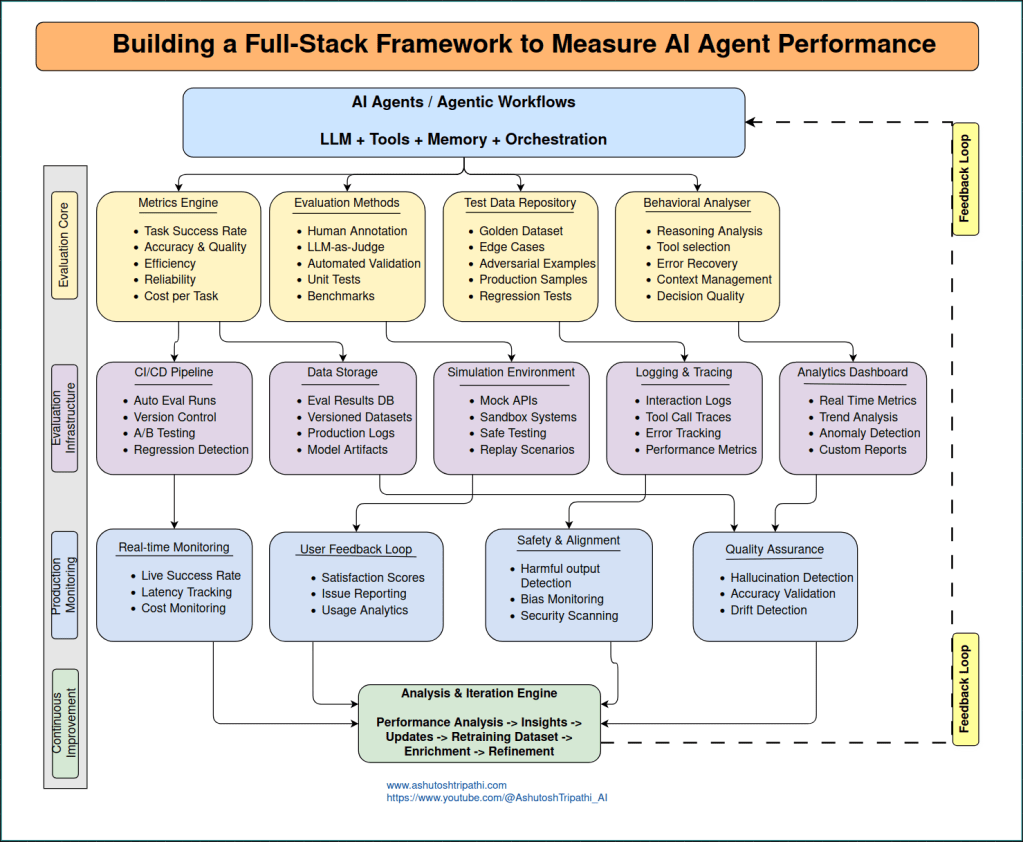

The architecture flows in five layers:
- Agent Layer – Your AI agent with its LLM, tools, memory, and orchestration logic
- Evaluation Core – Metrics engine, evaluation methods, test data repository, and behavioral analyzer working in parallel
- Infrastructure Layer – CI/CD pipelines, simulation environments, logging systems, analytics dashboards, and data storage
- Production Monitoring – Real-time monitoring, user feedback loops, safety checks, and quality assurance
- Continuous Improvement – Analysis and iteration engine that feeds insights back to improve the agent
The dotted line on the right shows the feedback loop—insights from production monitoring flow back to improve the agent, creating a continuous cycle of improvement.
Production Monitoring: Where Theory Meets Reality
Here’s the uncomfortable truth: your beautiful evaluation dataset doesn’t represent production. Real users will find edge cases you never imagined. Real-world data distribution will drift from your test data. Real production environments are messy.
This is why production monitoring isn’t optional – it’s where you learn what actually happens.
Real-Time Performance Monitoring
Track live success rates, latency, and costs as they happen in production.
Set up dashboards showing current performance. Set thresholds and alerts. If success rate drops below 85%, you should know immediately. If latency spikes above 10 seconds, you should get notified. If costs suddenly jump, you need to investigate.
User Feedback Loops
Make it easy for users to report issues or rate interactions. This direct feedback is invaluable.
Track satisfaction scores. Monitor issue reports. Analyze usage patterns. Users will tell you what’s working and what’s not, but only if you create easy ways for them to provide feedback.
I’ve discovered so many issues through user feedback that never appeared in our test suites. Users encounter combinations of situations and edge cases that are impossible to predict. Listen to them.
Comprehensive Logging
Log every interaction with full context: user input, agent response, tools called, reasoning traces, errors, performance metrics, everything.
You cannot debug what you cannot see. When something goes wrong in production, you need to be able to replay exactly what happened. Comprehensive logs make this possible.
I log to structured JSON files – one line per interaction – which makes it easy to search, filter, and analyze. When a user reports an issue, I can pull up the exact interaction trace and see what the agent was thinking.
Safety and Quality Monitoring
Continuously monitor for harmful outputs, hallucinations, bias, and quality degradation.
Set up automated checks for problematic content. Track factual accuracy over time. Monitor for distribution drift – is the agent’s performance degrading as data patterns change?
This ongoing quality assurance catches problems before they become systemic. I’ve caught multiple issues early through automated quality monitoring that would have been much worse if left undetected.
Production monitoring closes the loop. It tells you what’s actually happening with real users in the real world, which is the only thing that truly matters.
The Continuous Improvement Loop
Everything I’ve described so far comes together in a continuous improvement cycle. This is what separates agents that stagnate from agents that keep getting better.
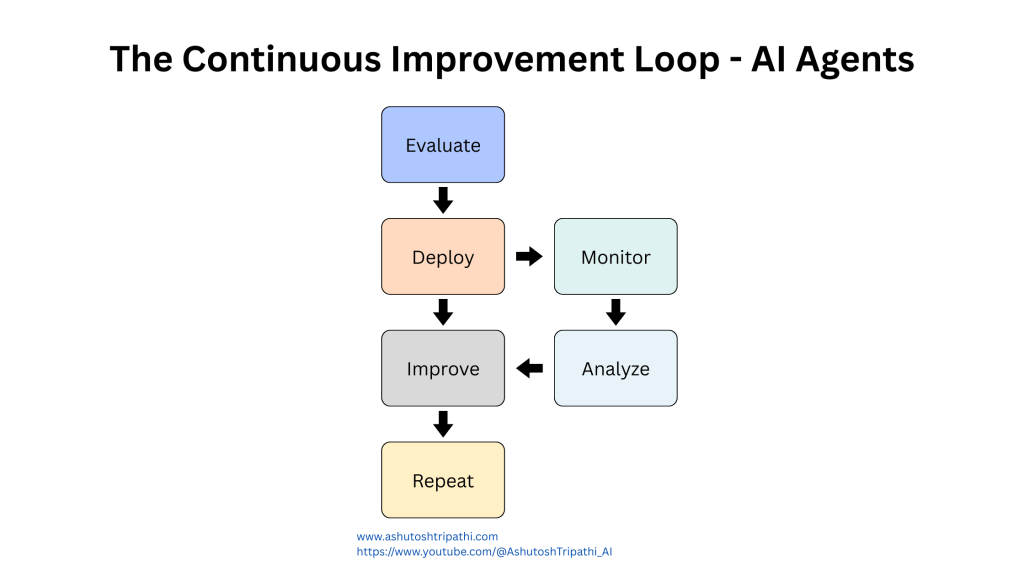
The loop works like this: your agent runs in production, you evaluate its performance through your various methods, you monitor real-world results, you analyze all this data to generate insights, you identify improvements to make, you implement those improvements, and then you start the cycle over again.
This isn’t a one-time thing you do before launch. It’s an ongoing process that never stops.
Here’s what I’ve learned about making this loop effective:
Analyze systematically. Don’t just look at overall metrics. Dig into patterns. Which types of tasks are failing? Which edge cases cause problems? What’s the distribution of errors? The insights come from understanding the details, not just tracking averages.
Prioritize improvements. You’ll find dozens of things you could improve. Focus on the changes that will have the biggest impact on your core metrics. Sometimes fixing one systematic issue improves performance across the board.
Test changes rigorously. When you make improvements, run them through your full evaluation suite before deploying. Make sure you’re actually improving things and not introducing new problems.
Deploy gradually. Use A/B testing to roll out changes to a small percentage of users first. Validate that improvements in your test environment translate to improvements in production before going all-in.
Measure the impact. After deploying changes, track whether they had the expected effect. Sometimes what works in testing doesn’t work in production. Sometimes small changes have surprisingly large impacts. You won’t know unless you measure.
Document everything. Keep notes about what you tried, what worked, what didn’t, and why. This organizational memory prevents you from repeating failed experiments and helps you understand long-term trends.
The teams that do this well treat evaluation and improvement as core parts of their development process, not afterthoughts. They invest in infrastructure early. They make decisions based on data. They iterate continuously.
The teams that struggle treat evaluation as something to do before launch and then forget about. They ship and pray. They fight constant fires in production because they don’t have the visibility or processes to prevent problems.
Common Pitfalls and How to Avoid Them
Through this journey, I’ve made basically every mistake possible. Here are the ones that hurt most and how to avoid them:
Pitfall #1: Testing Only Happy Paths
The Problem: Building test suites full of well-formed inputs and straightforward scenarios, then getting destroyed by edge cases in production.
The Solution: Explicitly test edge cases, error conditions, and adversarial inputs. Include empty strings, extremely long inputs, malformed requests, and attempts to manipulate the agent. Production users will find every edge case you didn’t test.
Pitfall #2: Not Tracking Token Usage
The Problem: Running agents in production without monitoring costs, leading to shocking bills when agents get stuck in loops or use resources inefficiently.
The Solution: Track every token and API call. Set budgets and alerts. Monitor for anomalies. Know what your agent costs before scaling it.
Pitfall #3: Overfitting to the Test Set
The Problem: Optimizing prompts until test scores look perfect, only to see poor performance in production because the agent doesn’t generalize.
The Solution: Use proper train/validation/test splits. Keep a held-out test set that you only use for final validation. High test accuracy means nothing if it doesn’t generalize to real data.
Pitfall #4: Ignoring Latency
The Problem: Focusing entirely on accuracy while ignoring response time, leading to user abandonment because the agent is too slow.
The Solution: Set latency budgets and enforce them. Fast-but-imperfect often beats slow-but-accurate. Users won’t wait around for responses.
Pitfall #5: Not Versioning Prompts
The Problem: Making dozens of prompt changes without tracking them, making it impossible to know what worked or roll back when performance drops.
The Solution: Version every prompt like code. Track performance by version. You need to know what worked and what didn’t to iterate effectively.
Pitfall #6: Skipping Regression Tests
The Problem: Improving one thing while accidentally breaking something else, with no way to catch it before deployment.
The Solution: Every bug you fix should become a regression test. Before deploying any change, run the full regression suite to ensure new features don’t break old functionality.
Pitfall #7: Insufficient Logging
The Problem: Trying to debug production issues with no context about what the agent was thinking, which tools it called, or what errors occurred.
The Solution: Log everything – full interaction traces, reasoning, tool calls, errors, performance metrics. You can’t debug what you can’t see.
Pitfall #8: Trusting LLM-as-Judge Blindly
The Problem: Setting up automated evaluation, seeing reasonable scores, and optimizing based on them without validating that the judge is measuring the right things.
The Solution: Regularly validate automated judges against human evaluation. If the LLM judge diverges from human judgment, adjust your evaluation criteria.
Pitfall #9: Not Testing Failure Recovery
The Problem: Testing only what happens when everything works, then discovering in production that the agent crashes when APIs fail or return errors.
The Solution: Explicitly test error scenarios. Mock API timeouts, malformed responses, and missing tools. Ensure your agent handles failures gracefully.
Pitfall #10: Deploying Without A/B Testing
The Problem: Deploying changes to all users at once, only to discover that “improvements” made things worse after everyone is already affected.
The Solution: Use A/B testing to deploy changes to a small percentage of users first. Validate improvements with real users before full rollout.
These mistakes are expensive to make. Learning from them before experiencing them yourself is much cheaper.
The Pattern in Successful Teams
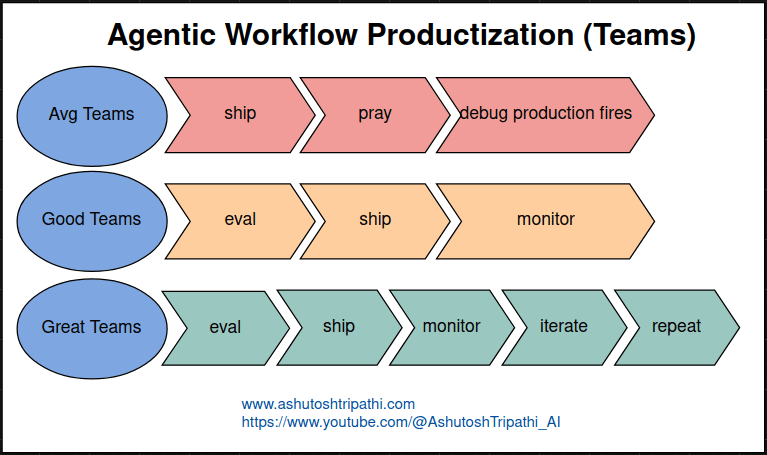
After observing various teams building agents and reflecting on my own experience, I’ve noticed a clear pattern in how teams approach evaluation:
Teams that struggle ship their agent, hope it works, and spend all their time fighting fires in production. They’re reactive. They don’t understand why things break. They make changes randomly hoping something will help. They burn out.
Teams that function evaluate their agent thoroughly before shipping and monitor what happens in production. They catch obvious problems early. They have visibility into performance. They can usually explain what went wrong when issues occur. They’re functional but not optimal.
Teams that excel evaluate continuously, ship changes incrementally, monitor everything in production, analyze the data systematically, generate insights from patterns, make targeted improvements based on evidence, and repeat this cycle endlessly. They’re proactive. They understand their agent deeply. They improve steadily over time. They build trust with users because the system keeps getting better.
The difference isn’t talent or resources. It’s process and mindset. Excellent teams treat evaluation as a core competency, not an afterthought. They invest in infrastructure early. They make data-driven decisions. They iterate based on real feedback.
Implementation Guide: Getting Started
If you’re building AI agents and want to implement this evaluation framework, here’s a practical roadmap:
Week 1: Define and Measure
- Write down your success criteria clearly
- Identify your four core metrics
- Set up basic logging for all agent interactions
- Create a spreadsheet to track manual evaluations
- Start collecting your first 20-30 evaluation examples
Week 2: Build Test Infrastructure
- Create your test dataset (50+ examples covering easy, edge, and adversarial cases)
- Set up version control for prompts and configurations
- Build a simple automated pipeline that runs evaluations
- Implement basic automated validation for objective checks
- Document your evaluation rubric
Week 3: Scale Evaluation
- Get human evaluation on 100-200 examples
- Set up LLM-as-judge and validate against human ratings
- Build a dashboard showing your core metrics
- Create simulation environments for your tools
- Set up alerts for key thresholds
Week 4: Production Readiness
- Implement comprehensive logging
- Set up production monitoring dashboards
- Create user feedback mechanisms
- Build your regression test suite
- Document your deployment and rollback procedures
Ongoing: Continuous Improvement
- Review metrics weekly
- Analyze patterns monthly
- Run experiments to test improvements
- Deploy changes gradually with A/B testing
- Update your test datasets based on production learning
This timeline is aggressive but achievable. You can adjust based on your team size and priorities. The key is starting early and building incrementally.
Final Thoughts
Evaluating AI agents is challenging because it requires both technical rigor and pragmatic judgment. You need systematic measurement, but you also need to understand that not everything can be captured in metrics.
The framework I’ve outlined here – clear success criteria, four core metrics, three evaluation methods, behavioral analysis, robust infrastructure, production monitoring, and continuous improvement – provides a solid foundation. But every agent is different, and you’ll need to adapt this framework to your specific use case.
What I’ve learned most deeply is that good evaluation is what separates agents that work in demos from agents that work in production. It’s not the glamorous part of building AI. It’s not the part that makes for exciting announcements. But it’s absolutely essential.
The teams that invest in evaluation infrastructure early, that treat it as a first-class part of their development process, that make decisions based on data rather than intuition—those are the teams building agents that users trust and rely on.
I hope sharing what I’ve learned helps you build better agents faster and avoid some of the painful mistakes I made along the way.
About the Author
Ashutosh Tripathi is a Principal ML Engineer with 14+ years of experience building production AI/ML systems. Currently focused on agentic AI, knowledge graphs, and MLOps. Also runs a YouTube channel creating AI education content for technical audiences.
Connect on LinkedIn | Watch me on YouTube
Found this helpful? Share it with other AI engineers building production agents.
Last updated: December 2025
 Data Science Duniya